With billions of users worldwide, Facebook remains one of the most powerful platforms for connecting with your target audience. Creating a Facebook business page allows companies to promote their services, interact with customers, and build brand awareness online.
Facebook currently has over 2.23 billion active users each month, which explains why so many businesses rely on it to reach potential customers. A Facebook business page helps organisations engage with existing clients while introducing their brand to new audiences. However, as Facebook has expanded its features and tools over time, the platform has become more complex, making it difficult for beginners to know where to start.
Before explaining the steps required to create a Facebook business page, let's first address some of the most frequently asked questions about Facebook pages and business accounts.
Frequently Asked Questions
Should I create a business page or a community page on Facebook?
When businesses join Facebook, they have the option of creating either a business page or a community group. The key difference between these two options is their purpose.
A business page is designed for companies and brands to promote their services, share updates, and communicate with their audience. It acts as a public profile where customers can learn more about your organisation.
A community page, often referred to as a group, focuses on bringing together individuals with shared interests. Members can participate in discussions, exchange ideas, and share opinions on specific topics.
While both options can be useful depending on the situation, most organisations benefit from creating a business page because it gives them greater control over content and brand presentation.
What is the difference between a Facebook business page and a business account?
Before creating a Facebook business page, you must first have a Facebook account. If you already have a personal Facebook profile, you can use it to create and manage your company’s page.
However, if you would prefer to keep your personal and professional activities separate, Facebook allows you to create a business account specifically for managing advertisements and pages. These accounts have limited interaction with personal profiles and mainly operate through the business pages they manage.
Does it cost money to create a Facebook business page?
Creating a Facebook business page is completely free. Facebook offers pages without charge because businesses using the platform help attract user attention and engagement.
Facebook generates revenue by offering advertising services. While running Facebook advertisements requires payment, the organic features of a business page — such as posting content and interacting with followers — remain free.
How to Create a Facebook Business Page
Step 1: Create your Facebook business page
To begin, log in to your Facebook account and click the plus (+) symbol in the top-right corner of the screen. From the menu, select Create Page.
Alternatively, you can go directly to the page creation tool by visiting:
https://www.facebook.com/pages/creation/
Next, you will need to enter some basic information about your business or brand, including the page name, category, and a short description. These details can be edited later if necessary.
Once you have completed the required fields, click Create Page.
Step 2: Add a profile picture and cover photo
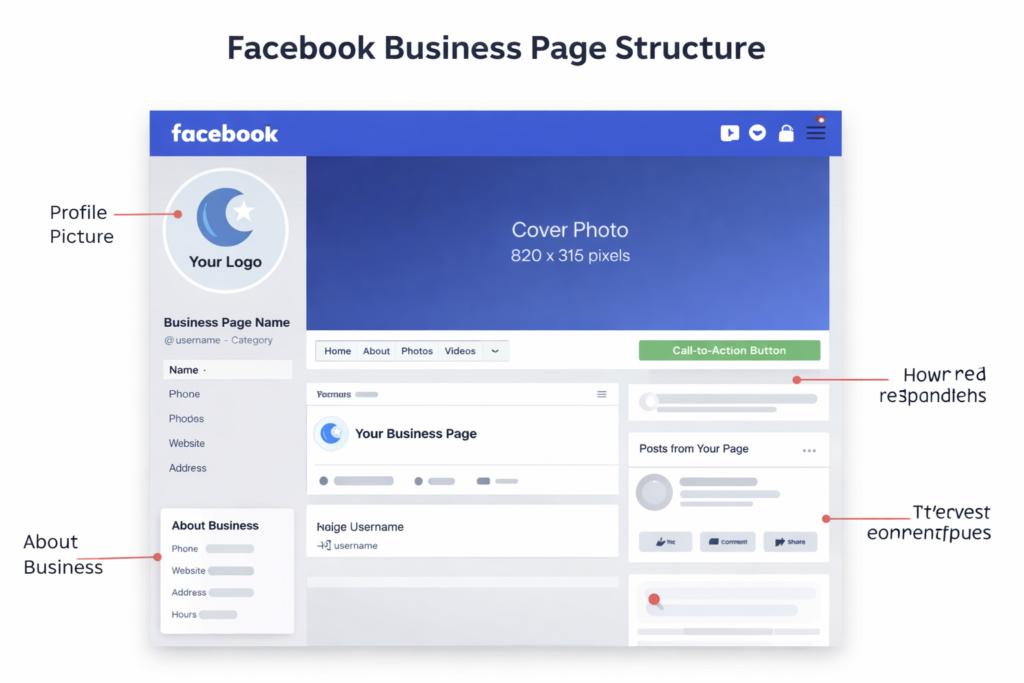
After creating your page, the next step is to upload a profile picture. Most businesses choose to use their company logo or a recognisable image that helps users identify the brand in search results.
Your profile picture should be high resolution and properly centred. The minimum recommended size is 180 × 180 pixels, while the ideal size is 360 × 360 pixels.
You should also upload a cover photo, which appears as the large banner at the top of your page. This image should represent your business visually and make a strong first impression.
The recommended size for a Facebook cover photo is 820 × 312 pixels.
Design platforms such as Canva offer templates specifically designed for Facebook pages, making it easier to create professional graphics. Tools like Buffer also provide guides and examples for designing effective cover images.
Step 3: Add your business information
Once your images are in place, you should complete the rest of your business details. In the left-hand menu, select Page Info.
Here you can include important information such as your phone number, email address, website link, location, and business hours. You can also connect your other social media accounts and create a username for your page.
A custom username makes it easier for people to find your business and provides a unique URL that you can share with customers.
Because Facebook pages often rank highly in search engine results, your Facebook page may appear above your own website. For this reason, it is important to complete as much information as possible so potential customers can easily learn about your business.
Step 4: Add a call-to-action button
Every Facebook page includes a call-to-action (CTA) button located beneath the cover photo. This button encourages visitors to interact with your business or take a specific action.
To add one, click Add a Button below your cover image and choose the action you want visitors to take. Common options include Send Message, Book Now, or Sign Up.
You can link this button to a page on your website or direct visitors to specific content within your Facebook page.
If you want to see how effective your CTA is, you can view performance data by clicking the dropdown arrow and selecting View Insights.
Step 5: Promote your Facebook business page
Once your page has been created and populated with content, the next step is promotion. One of the easiest ways to begin building an audience is by inviting your Facebook friends to follow your page.
To do this, click the three-dot menu beneath your CTA button and select Invite Friends.
You should also share your Facebook page link on other social media platforms, include it in online directories such as Yelp, and add it to your official business website.
Over time, consistently publishing engaging content and interacting with your audience will help grow your following. Participating in relevant Facebook groups where your target audience spends time can also help increase visibility and attract new followers.